
What Recommended and Highest mean when you price a ticket
When you type a price on the dashboard, three cards appear side by side.
- Your price is the price you typed. It is selected to start with.
- Recommended is a higher price you could charge instead.
- Highest is higher again.
The two offers are titled Charge and their price, with the tag Recommended or Highest.
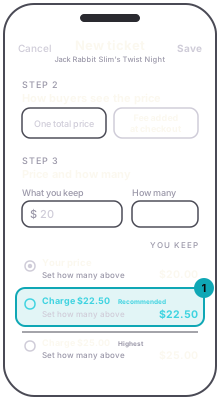
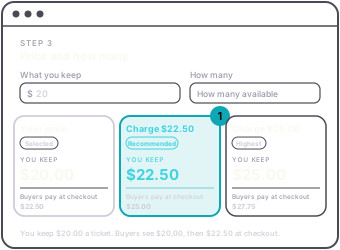
Each card shows You keep for one ticket, what buyers pay, and the total once you fill in how many. Pick a card to use that price, or leave Your price selected. Nothing is raised unless you choose it. The same cards appear in Adjust price on an existing tier, where the total uses Expected sales and you press Use, then Save, to set the price. They also appear for Early Bird in the price ladder.
When you add a ticket with One total price, the line under the cards ends in more when people buy two or more together. Press it to see a table for one order of 1 to 4 tickets: what buyers pay, what you keep, and what you keep each. The fee is charged once per order, so every ticket after the first keeps more.
The app shows the same three choices as rows under You keep: Your price, then Charge and a price, tagged Recommended or Highest. Each row shows what you keep for one ticket, and the total once you fill in How many. Tap a row to pick it, then press Save. With One total price, more when people buy two or more together opens the same table of 1 to 4 tickets. Edit ticket opens on the ticket's current price.